Shift Scheduler Blog
Nejlepší software pro plánování směn v roce 2026: kompletní srovnání
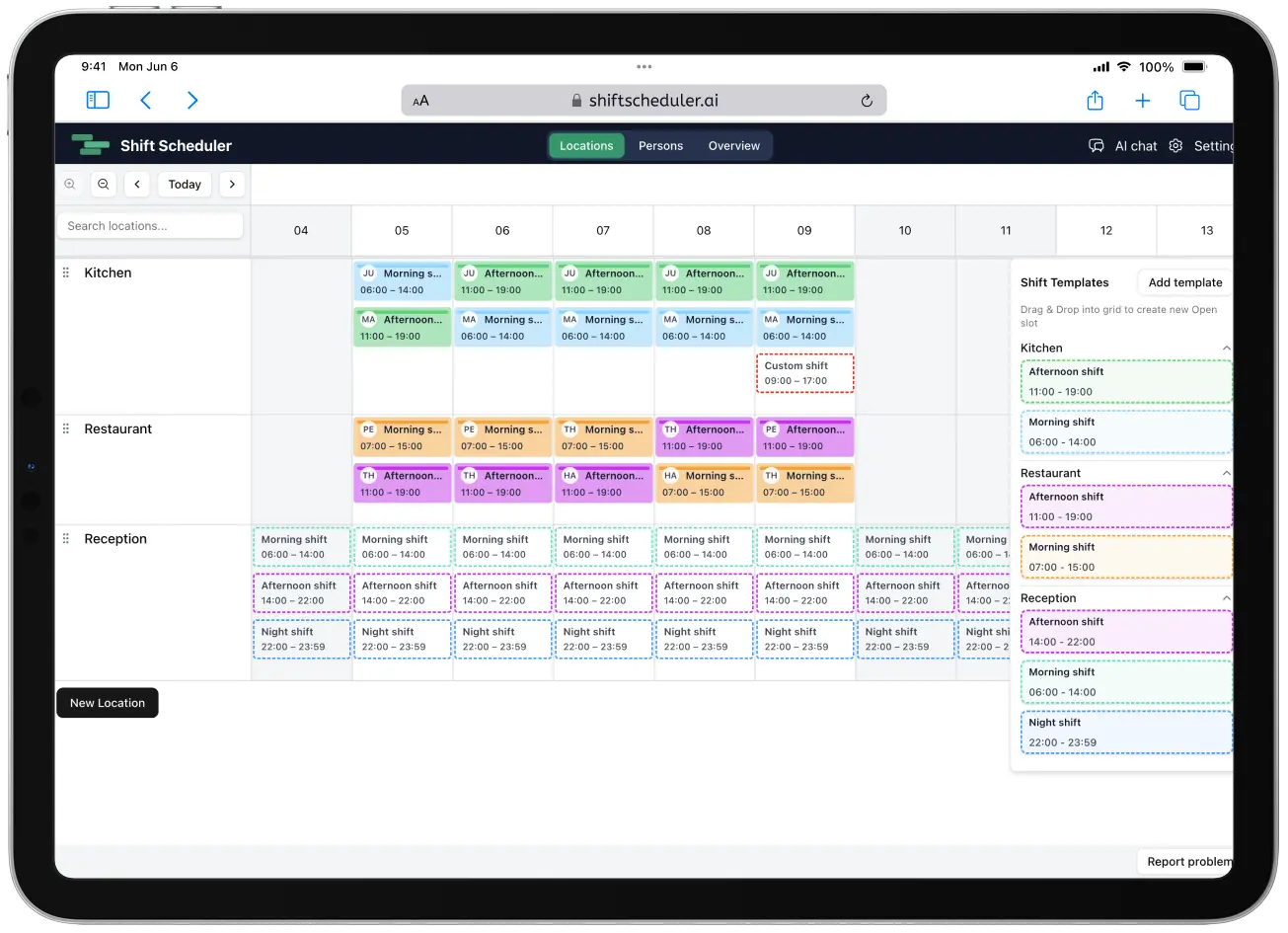
Plánování směn se za poslední roky výrazně změnilo.
To, co dřív byla práce v tabulce, je dnes optimalizační úloha s pravidly, dostupností, kvalifikacemi, prognózami a pracovněprávními požadavky.
V tomto článku porovnáváme nejrelevantnější nástroje pro plánování směn v roce 2026:
- ShiftScheduler.ai
- Deputy
- Connecteam
- Timefold
- Shiftboard
- Homebase
- Microsoft Teams (Shifts)
- Plantime
Pojďme se na ně podívat.
Rychlé srovnání
| Nástroj | AI optimalizace | Nejvhodnější pro | Cenový model |
|---|---|---|---|
| ShiftScheduler.ai | ✅ Pokročilá (CP-SAT + AI pravidla) | Malé a střední týmy, které chtějí chytrou automatizaci | Ručně zdarma / placená AI |
| Deputy | ✅ Automatické plánování + prognózy | Retail, gastronomie, zdravotnictví | Za uživatele / měsíc |
| Connecteam | ⚠️ Automatizace založená na pravidlech | Provozně náročné týmy | Měsíční tarify podle úrovně |
| Timefold | ✅ Open-source solver | Vývojáři a podniky | Open source / Enterprise |
| Shiftboard | ✅ Enterprise optimalizace | Velké nebo odborově organizované týmy | Individuální nabídka |
| Homebase | ⚠️ Plánování s podporou AI | Menší podniky ve službách | Za pobočku |
| Microsoft Teams Shifts | ⚠️ Základní automatizace | Uživatelé Microsoft 365 | Součást M365 |
| Plantime | ✅ Vyvažování zátěže pomocí AI | Malé a střední firmy | Zdarma + 3 EUR/smlouva |
1️⃣ ShiftScheduler.ai
ShiftScheduler.ai kombinuje dvě vrstvy, které jsou pro moderní plánování směn zásadní.
Sběr pravidel v přirozeném jazyce
Manažeři popíšou pravidla tak, jak by je vysvětlili kolegovi:
- "Na noční směně musí být jeden zkušený technik."
- "Nikdo by neměl pracovat více než 5 dní v řadě."
- "Anna preferuje ranní směny."
Systém z těchto vět automaticky vytvoří strukturovaná omezení.
Optimalizační engine CP-SAT
Na pozadí ShiftScheduler.ai používá solver CP-SAT z Google OR-Tools.
Díky tomu umí řešit:
- tvrdá a měkká omezení
- dodržení zákonného odpočinku, pokud je definovaný
- férové rozdělení směn
- detekci konfliktů
- matematické ověření rozpisu
Během beta testování je ShiftScheduler.ai aktuálně pro všechny zcela zdarma.
Nejvhodnější pro: firmy, které chtějí skutečnou optimalizaci, ne jen kalendář s přetahováním směn.
2️⃣ Deputy
Deputy je zavedená platforma pro workforce management, často používaná v gastronomii, retailu a podobných provozech.
Hlavní funkce
- automatické plánování s AI
- prognózy poptávky
- podpora souladu s pracovním právem
- správa přesčasů
- výkazy práce a integrace mezd
- mobilní výměny směn
Ceny
- Lite: 5 USD/uživatel/měsíc
- Core: 6,50 USD/uživatel/měsíc
- Pro: 9 USD/uživatel/měsíc
Nejvhodnější pro: středně velké provozy, které potřebují prognózy a nástroje pro soulad s pravidly.
3️⃣ Connecteam
Connecteam není jen nástroj na rozpis směn. Je to širší platforma pro řízení provozních týmů.
Hlavní funkce
- plánování pomocí drag-and-drop
- šablony a otevřené směny
- upozornění na konflikty
- týmový chat
- evidence docházky s GPS
- digitální formuláře a checklisty
Ceny
- zdarma až pro 10 uživatelů
- Basic: 29 USD/měsíc
- Advanced: 49 USD/měsíc
- Expert: 99 USD/měsíc
Nejvhodnější pro: terénní služby, logistiku a týmy s náročným každodenním provozem.
4️⃣ Timefold
Timefold není hotová aplikace na plánování směn. Je to open-source optimalizační engine.
Pod licencí Apache 2.0 umožňuje vývojářům stavět vysoce přizpůsobené plánovací systémy.
Podporuje například:
- omezení dostupnosti
- limity pracovních hodin
- pravidla férového rozdělení
- pevně přiřazené směny
- optimalizaci tras
Nejvhodnější pro: firmy nebo vývojářské týmy, které budují vlastní systém pro řízení pracovní síly.
5️⃣ Shiftboard
Shiftboard se zaměřuje na složité plánování směn ve velkých organizacích.
Silné stránky
- vynucování odborových a interních pravidel
- žádosti o směny
- dobrovolné přesčasy
- plánování pohotovostí
- auditní logy pro soulad s pravidly
- pokročilé reporty s více než 40 přehledy
Ceny jsou dostupné na základě individuální nabídky.
Nejvhodnější pro: velké organizace s přísnými požadavky na soulad s pravidly.
6️⃣ Homebase
Homebase je oblíbený hlavně u restaurací a menších maloobchodů.
Hlavní funkce
- zveřejnění rozpisu přes SMS nebo e-mail
- AI plánování podle prognóz prodeje
- správa volna a absencí
- sledování mzdových nákladů v reálném čase
- doplňky pro mzdy a HR
Ceny
- zdarma pro 1 pobočku
- Essentials: 30 USD/pobočka
- Plus: 70 USD/pobočka
- All-in-One: 120 USD/pobočka
Nejvhodnější pro: malé podniky ve službách.
7️⃣ Microsoft Teams (Shifts)
Microsoft Teams obsahuje jednoduchý plánovací modul s názvem Shifts.
Funkce
- šablony rozpisů
- import z Excelu
- správa dostupnosti
- výměny směn
- mobilní píchačky
- GPS sledování
Shifts je součástí plánů Microsoft 365.
Nejvhodnější pro: firmy, které už fungují v ekosystému Microsoftu.
8️⃣ Plantime
Plantime staví na moderním rozhraní a vyvažování pracovní zátěže pomocí AI.
Hlavní funkce
- přiřazování směn pomocí AI
- párování podle dovedností
- optimalizace nákladů
- správa dovolených a absencí
- více pohledů na plán
Ceny
- bezplatný plán včetně AI
- Pro: 3 EUR za smlouvu/měsíc
Nejvhodnější pro: malé a střední týmy, které chtějí přehledný nástroj s podporou AI.
AI vs. ruční plánování
| Ruční plánování | Plánování s AI |
|---|---|
| Založené na tabulkách | Založené na optimalizaci |
| Pokus a omyl | Matematické řešení |
| Těžko škálovatelné | Zvládá velké týmy |
| Náchylné ke zkreslení | Pravidla férovosti |
| Časově náročné | Minuty nebo sekundy |
Závěr
Správný nástroj závisí hlavně na:
- velikosti týmu
- složitosti plánování
- požadavcích na soulad s pravidly
- potřebných integracích
- rozpočtu
Rychlé doporučení
- Chcete skutečnou matematickou optimalizaci → ShiftScheduler.ai
- Potřebujete prognózy a soulad s pravidly → Deputy
- Řídíte terénní provoz → Connecteam
- Máte enterprise složitost → Shiftboard
- Už používáte Microsoft → Teams Shifts
- Malá restaurace nebo maloobchod → Homebase
- Stavíte vlastní systém → Timefold
- Čisté rozhraní s AI vyvažováním → Plantime
V roce 2026 už plánování směn není jen o zaplňování políček.
Jde o optimalizaci provozu.
A AI se rychle stává standardem.