Shift Scheduler Blog
Public Holiday Scheduling: A Shared Holiday Calendar for Every Workspace
Public holidays are easy to miss when they live in a separate calendar. That can lead to an understaffed bank holiday, a misleading hours report, or a rota that looks ordinary even though the day is anything but ordinary.
Shift Scheduler now includes a workspace-wide public holiday calendar. Admins and managers can prepare the calendar for each year, holiday dates are highlighted directly in the People and Locations schedules, and Overview reports how many regular worked hours fell on public holidays.
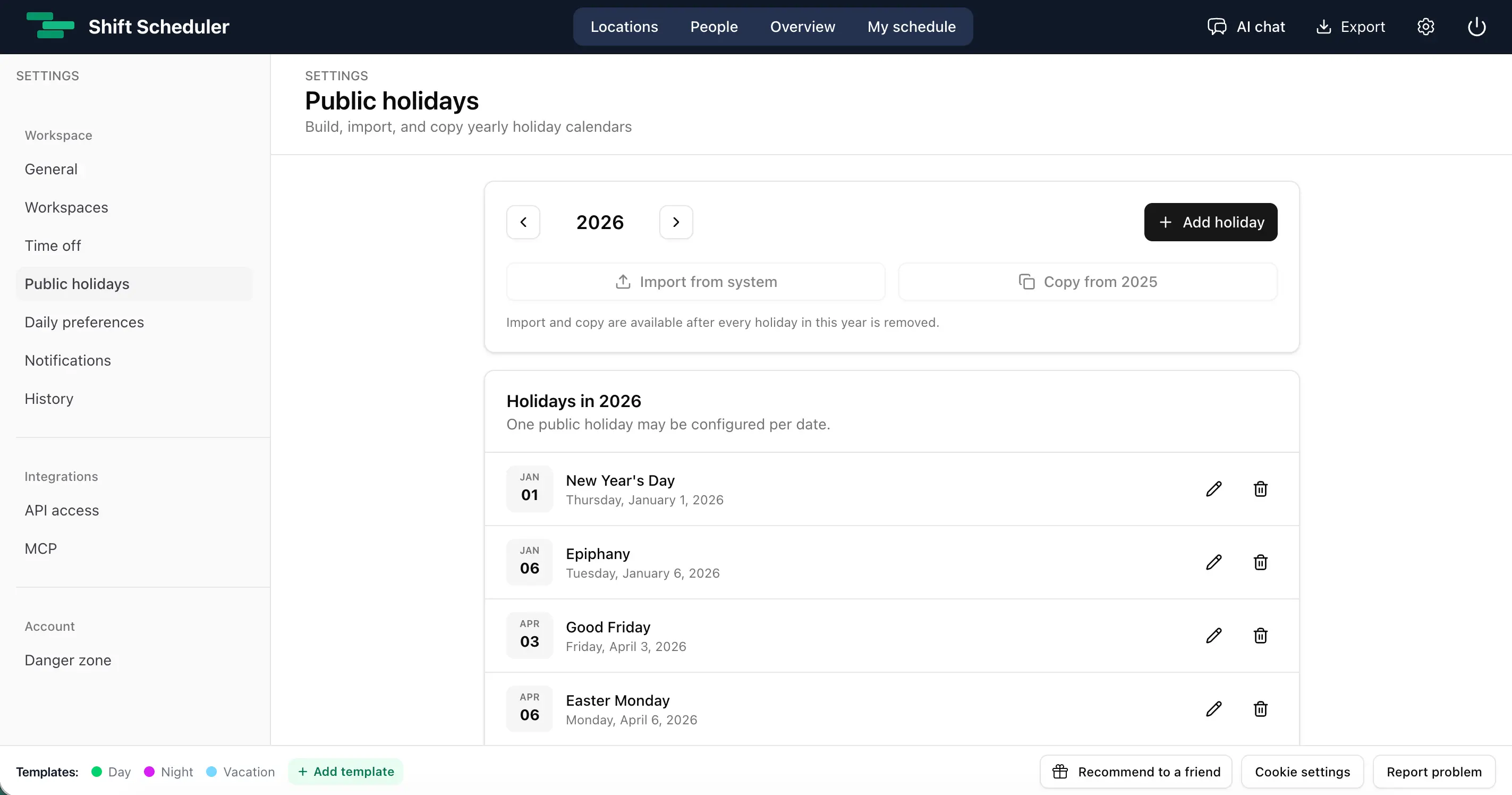
Build a public holiday calendar in three ways
Open Settings → Public holidays and select the year you want to manage. You can create that year's calendar in whichever way suits your organization:
- Import holidays for a country or region. Choose a country and, where available, a state, province, or region. Review the result before saving it.
- Add holidays manually. Enter a name and date for a local closure, company holiday, or any date that is relevant to your team.
- Copy the previous year. Reuse the names and month/day values from the immediately preceding year, then adjust the result where necessary.
Imported holidays are saved as an editable snapshot. They do not change automatically after an update to the source data, so the calendar your team approved will not unexpectedly shift later. You can rename or delete any entry and add custom dates alongside imported ones.
Import and copy are available only while the target year is empty. This prevents a bulk action from silently overwriting a calendar that someone has already started editing.
See public holidays while scheduling shifts
Once a date is in the workspace calendar, its entire column receives an amber highlight in both People and Locations. The highlight takes precedence over the normal weekend background, while shift editing, selection, preferences, and other calendar interactions continue to work as before.
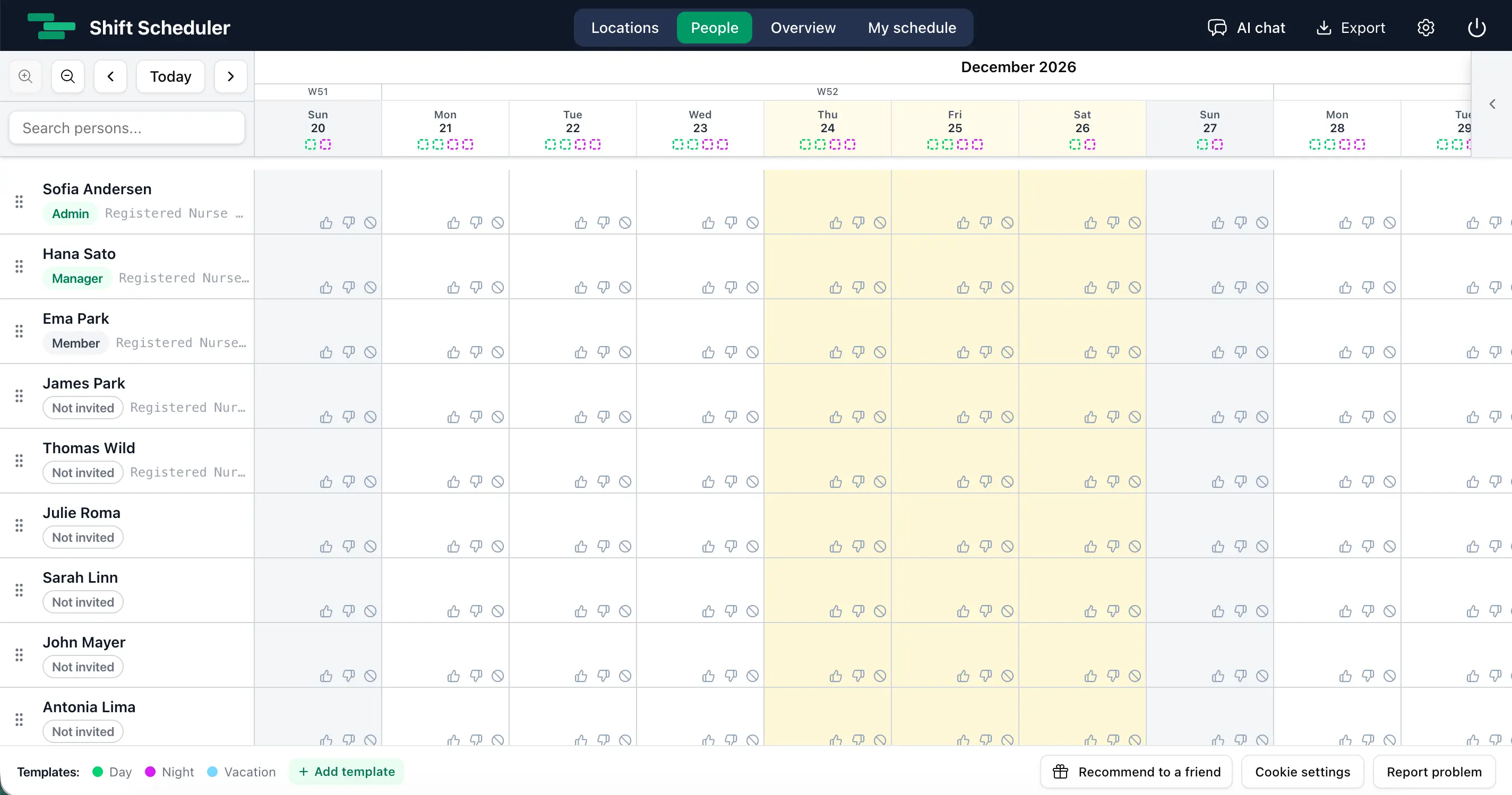
The same calendar applies to the whole workspace. This keeps the rota consistent: managers do not need to maintain separate holiday lists for every person or location.
Track public holiday hours in Overview
Overview now shows public holiday hours next to the Saturday and Sunday totals for every month. The same figure is included when monthly data is combined into a yearly summary. The short label is localized—for example, PH in English and ŠS in Slovak—and its full meaning appears on hover.
The calculation follows clear rules:
- Only regular worked shifts count toward public holiday hours.
- Time Off does not count as work on a public holiday.
- An overnight shift belongs to its start date, matching the rest of the schedule.
- A shift on a weekend public holiday counts in both totals. For example, an eight-hour Saturday public holiday contributes eight hours to Saturday and eight hours to public holidays.
This overlap is intentional. “Worked on Saturday” and “worked on a public holiday” answer two different operational questions.
What public holidays do—and do not—change
The public holiday calendar is designed for visibility and reporting. Adding a holiday:
- highlights the date in scheduling grids;
- adds public holiday hours to monthly and yearly Overview summaries;
- gives managers one shared, editable source of holiday dates.
It does not automatically create Time Off, change staffing demand, alter AI scheduling rules, apply overtime, or calculate holiday pay. Employment law, collective agreements, and pay policies differ between organizations and countries, so those decisions remain under your control.
Who can manage the calendar?
Every workspace member can see public holiday dates in the schedule. Admins and managers can add, edit, delete, import, and copy them. Holiday calendars are isolated by workspace, so a date configured for one team never appears in another team's rota.
Frequently asked questions
Can I import public holidays automatically?
Yes. In Settings → Public holidays, choose a year and jurisdiction, review the preview, and confirm the import. The imported list becomes an editable snapshot rather than a permanently synchronized feed.
Can I add a company holiday that is not a national public holiday?
Yes. Add it manually with the name and date your team uses. Manual and imported dates behave the same way in the schedule and Overview.
Does a public holiday automatically give employees Time Off?
No. Public holidays are visual and reporting markers. They do not create leave requests, remove shifts, or change staffing requirements.
How are weekend public holidays counted?
A regular worked shift on a weekend public holiday contributes to both the relevant weekend total and the public holiday total. Time Off remains excluded.