Shift Scheduler Blog
AI Shift Schedule Repair: Fill Rota Gaps with Fewer Changes
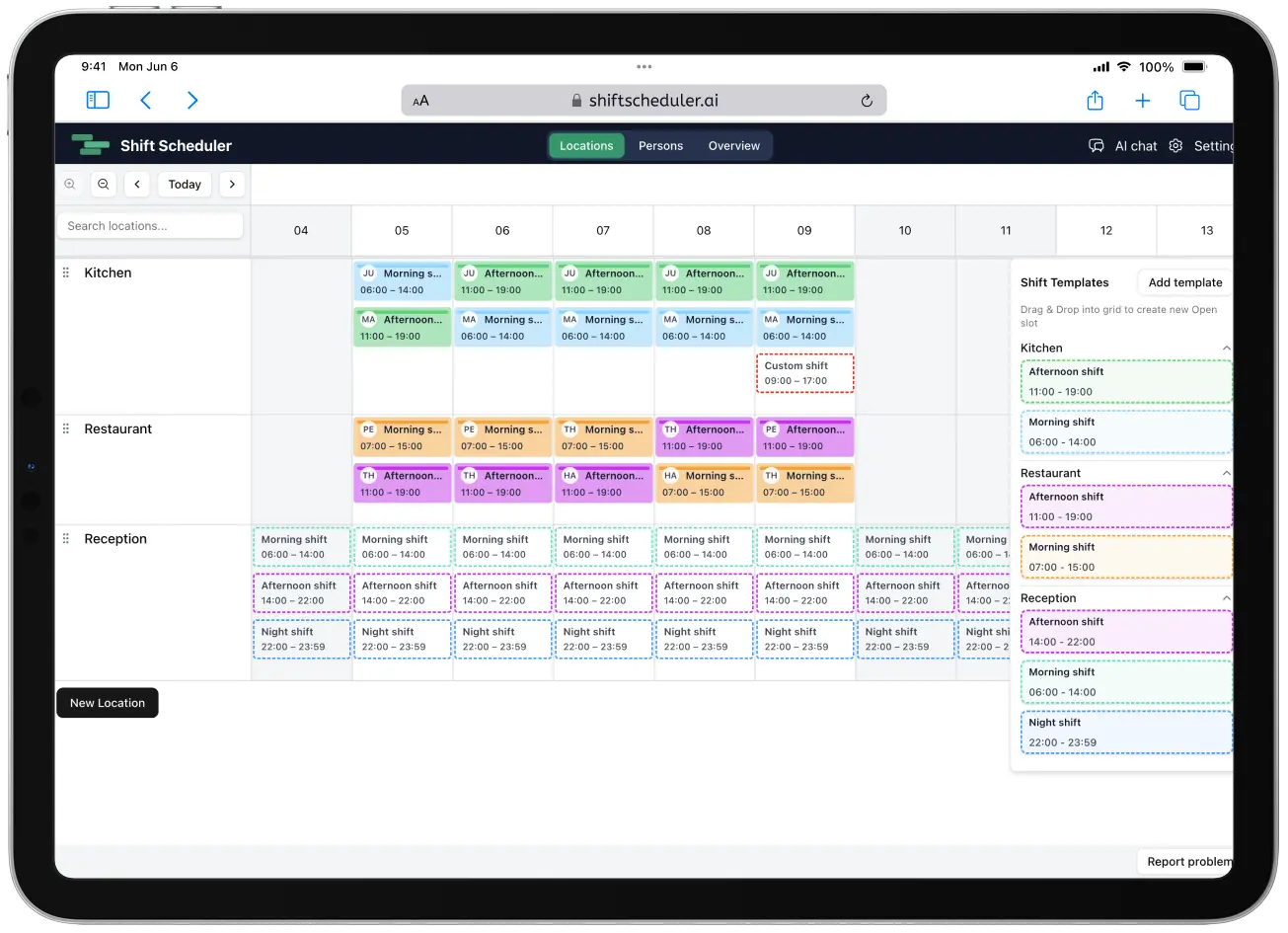
A monthly rota can be correct on publication day and unworkable two weeks later. Someone becomes ill, takes emergency leave, or is no longer available for a group of shifts. Removing those assignments exposes the coverage gaps, but rebuilding the entire rota would disrupt colleagues who have already arranged childcare, travel, appointments, or other plans around it.
AI Schedule Repair solves a different problem from ordinary rota generation. It keeps the dates, times, locations, and shift types already planned, fills uncovered slots where possible, and changes as few existing assignments as the coverage target allows.
In one sentence: schedule repair is constraint-aware AI rescheduling for an existing staff rota, optimized for maximum coverage with minimum disruption.
The use case: an employee is absent for the rest of the month
Imagine a hospital ward publishes its September nurse rota. Halfway through the month, one nurse reports sick and cannot work for the remaining two weeks.
The staffing manager can:
- block the nurse's unavailable dates and remove their remaining assignments
- ask Shift Scheduler to repair only the affected two-week interval
- keep specific people or individual shifts unchanged where needed
- let the AI fill open duties and move other assignments only when coverage requires it
- review a result that clearly reports what stayed, moved, was created, was removed, or could not be filled
This is useful in nurse rostering, care homes, hospitality, retail, manufacturing, security, logistics, and any operation where a published shift schedule must survive an unexpected absence.
What is minimal-disruption schedule repair?
Minimal-disruption schedule repair is an optimization process that starts from the current rota rather than from a blank calendar.
Every planned duty in the selected period becomes part of the model, including already assigned shifts and uncovered slots. The scheduler first applies mandatory availability, overlap, rest, qualification, hour, and rotation rules. It then searches for the best achievable coverage. Only after that does it minimize changes to the existing assignments.
This distinction matters. A conventional AI shift scheduler may generate a perfectly valid new rota but move many people unnecessarily. A repair optimizer treats the published plan as a valuable baseline.
How the AI chooses a repaired rota
Shift Scheduler applies the objectives in a strict order:
- Respect hard constraints. Blocked dates, time off, overlaps, required rest, hour limits, qualifications, and mandatory scheduling rules cannot be traded away.
- Maximize required coverage. The system fills as much required work as the available team can legally and safely cover.
- Protect coverage priorities. More important staffing requirements take precedence when not every gap can be filled.
- Minimize disruption. Among equally well-covered solutions, the solver keeps the greatest possible number of existing assignments unchanged.
- Optimize quality. Balancing, soft rules, fairness, recent schedule history, and employee preferences decide between the remaining alternatives.
Coverage therefore comes before convenience, but disruption is minimized within the best achievable coverage. Filling a shift that was already open does not count as disruption.
What can and cannot change
Schedule repair changes staffing assignments, not the shape of the rota.
| Preserved during repair | May change during repair |
|---|---|
| Shift date | Assigned person |
| Start and end time | An open slot may become assigned |
| Shift template or custom shift shape | An assignment may become unfilled if no valid person exists |
| Location | Another in-scope assignment may be reassigned to protect coverage |
| Shift identity when reassigned |
Custom duties are supported. If a manager created a one-off shift with unusual hours, the AI can reassign that duty without converting it into a standard template or changing its time.
By default, all regular assignments in the selected interval can move. That gives the optimizer enough freedom to solve a chain of coverage conflicts while still penalizing every avoidable change.
Three ways to protect existing plans
Natural-language instructions let a staffing manager define different levels of protection.
Freeze a person completely
Ask: Repair the rota for 16–30 September, but make no changes for Nurse 1.
Their current assignments stay in place, and the repair will not add new shifts for them.
Preserve a person's existing shifts
Ask: Keep Nurse 1's existing shifts, but they may cover additional gaps.
Their current duties are protected, while the optimizer may assign them to new work if all rules allow it.
Lock one important assignment
Ask: Do not change Nurse 1's Friday night shift.
That specific assignment becomes fixed while the rest of the selected rota remains repairable.
If a requested lock conflicts with blocked availability, time off, or another hard rule, repair stops without changing the schedule. The system does not silently weaken a mandatory constraint to make the request appear successful.
Example: why filling gaps may still require a reassignment
Suppose Monday and Tuesday both have open night shifts. Only Alex can legally work Monday, while Alex and Sam can both work Tuesday. Sam is already assigned to a Tuesday day shift.
A simple gap-filling tool might assign Alex to Tuesday first and then discover that Monday cannot be covered. Schedule repair considers the complete interval together. It can keep Alex available for Monday and, if valid, move Sam's Tuesday assignment or use another eligible person.
This is why the order of objectives matters. The system will accept one necessary reassignment when that change produces better required coverage, but it will not reshuffle unrelated shifts after the same coverage has already been achieved.
Use cases beyond sick leave
The same workflow applies whenever an existing rota needs a controlled correction:
- Emergency leave: repair the remainder of a week after a family emergency.
- Extended absence: cover several weeks of nurse, carer, or operator shifts without regenerating the month.
- Training or certification changes: remove a person from duties they can no longer cover and protect specialist shifts.
- Demand changes: fill newly opened capacity while keeping the published rota stable.
- Location-specific shortages: repair one branch, ward, restaurant, or production line without touching other locations.
- Late availability updates: incorporate new blockers and find the smallest viable set of staffing changes.
The repair range can cover up to 31 days and may be limited to one location. Shifts outside that scope remain fixed but still count when the solver checks overlaps, rest, hours, and transitions.
How to request a rota repair
Use the AI scheduling chat and describe the period, location if relevant, and anything that must stay fixed.
For example:
Maria is unavailable from 16 to 30 September. Block those dates, remove her affected shifts, and repair the rota for the Bratislava ward. Keep Daniel's existing shifts and do not change Petra's Friday night shift.
When unavailability and repair are part of the same request, the calendar change is completed first. The repair then reads the latest grid, blockers, time off, rules, and assignments immediately before solving.
No internal person IDs or shift IDs are needed. The assistant resolves people and shift references from the names and context in the request.
What the repair result reports
After a successful repair, the response separates the outcome into five counts:
- Kept: baseline assignments that remain with the same person
- Created: previously open duties that are now assigned
- Reassigned: existing shifts moved to another person
- Removed: baseline assignments that could not remain staffed
- Unfilled: required slots that still have no valid assignment
The result also reports whether the solver proved the solution optimal or returned the best feasible solution within its execution limit. If every gap cannot be covered, the valid partial repair is still applied and the remaining shortage is explicit.
Does schedule repair have a preview or draft mode?
Schedule repair follows the workspace's existing publication setting.
If Draft Schedule is enabled, the complete repair is staged in the shared draft for managers to review and publish. If draft mode is not enabled, the repaired assignments are committed immediately. Repair does not create a temporary one-off draft of its own.
This keeps publication behavior consistent with manual edits and ordinary AI staff scheduling. Teams that need approval can enable the workspace-wide Draft Schedule workflow; teams that publish changes directly keep their existing process.
Safe, atomic changes
The repair is applied as one atomic change set. Reassigned shifts retain their existing identity, while newly covered gaps are recorded as AI-created assignments.
Before writing, Shift Scheduler verifies that the schedule has not changed since the solver read it. If another manager edits the same interval in the meantime, the repair aborts instead of overwriting newer work. A successful operation creates one schedule-repair history event, and notifications or webhooks are sent only after the complete change has committed.
AI rota planning without unnecessary churn
AI shift scheduling is most useful when it understands that an existing rota has social as well as operational value. A shift assignment is not just a cell in a grid; employees have already planned around it.
Minimal-disruption schedule repair combines that human reality with mathematical workforce optimization. It does not promise that every assignment can stay unchanged. It makes the stronger, measurable promise: achieve the best valid coverage first, then preserve as much of the current rota as possible.
Quick facts for staffing managers
- Schedule repair works on an existing rota, not a blank schedule.
- It covers a selected interval of up to 31 days and can target one location.
- Dates, times, templates, custom shift shapes, and locations remain unchanged.
- Required coverage is optimized before assignment stability.
- Existing assignments stay in place whenever an equally well-covered solution permits it.
- Individual people or shifts can be protected with natural-language instructions.
- Current blockers, time off, and hard scheduling rules remain authoritative.
- Out-of-scope assignments still count for overlap, rest, hour, and transition checks.
- Results show kept, created, reassigned, removed, and unfilled totals.
- Existing draft mode stages the repair; otherwise it is committed immediately.
FAQ
What is AI shift schedule repair?
AI shift schedule repair is constraint-aware rescheduling that fills gaps in an existing staff rota while keeping as many current assignments unchanged as possible. It differs from generating a new rota because the published schedule is treated as the baseline to preserve.
Can AI cover sick leave without rebuilding the whole rota?
Yes. Select the affected period, optionally limit it to one location, and ask the AI to repair the schedule. It evaluates the full interval, fills open duties first where possible, and reassigns existing shifts only when better coverage requires it.
Does minimum disruption ever come before coverage?
No. Hard constraints and maximum required coverage come first. Minimum disruption decides between solutions that achieve the same coverage level, so the scheduler will make a necessary change when it can cover otherwise unfilled work.
Can I stop the AI from moving a particular employee's shifts?
Yes. You can freeze a person completely, preserve their existing shifts while allowing new assignments, or lock one named shift. A lock that conflicts with a blocker or mandatory rule fails safely without writes.
Will schedule repair change shift times or locations?
No. It repairs staffing assignments only. Dates, start and end times, locations, templates, and custom shift shapes stay unchanged.
What happens if not every rota gap can be filled?
Shift Scheduler applies the best valid partial repair and reports the remaining unfilled slots. It never breaks blocked availability or another hard scheduling rule merely to claim full coverage.
Can I preview an AI schedule repair before employees see it?
Yes, if the workspace already uses Draft Schedule. The repair is added to the shared draft for review. Workspaces without draft mode apply the repair immediately; there is no separate one-time preview.