Shift Scheduler Blog
Shift Swaps and Give-Aways: Controlled Changes to the Staff Rota
Plans change after a rota has been published. An employee needs a different day off, a colleague would prefer the opposite shift, or somebody can no longer cover an assignment. Handling that through group chats and spreadsheets is quick at first, but it leaves the staffing manager to reconstruct who agreed to what.
Shift Scheduler now includes a structured shift swap and give-away workflow. Employees can propose a change from their own schedule, the selected colleague has 24 hours to respond, and the rota changes only after an authorised manager or admin gives final approval.
The result is employee self-service without losing control of staffing, working-time conflicts, or the published schedule.
What is a shift swap?
A shift swap, also called a shift exchange or shift trade, is an agreement in which two employees exchange assigned shifts. Each person keeps a scheduled assignment, but works the other person's date or time.
In Shift Scheduler, a swap has two approval stages:
- The requesting employee selects one of their upcoming shifts, a colleague, and one of that colleague's upcoming shifts.
- The colleague accepts or declines the proposal within 24 hours.
- An accepted request moves to manager approval. The rota has not changed yet.
- A manager or admin checks the request and approves or rejects it.
- Approval atomically switches the two assignments in the published rota.
This prevents a casual conversation from being mistaken for a confirmed schedule change.
What does “give away a shift” mean?
Giving away a shift transfers one assigned shift to another employee without receiving a shift in return. It is useful when a colleague can cover the work but a direct exchange is unnecessary.
The control process is the same as for a swap: the receiving employee must accept first, and a manager or admin must approve before the assignment changes. A give-away therefore does not silently create an uncovered shift or move work to somebody who has not agreed to take it.
| Request type | Employee result after approval | Required decisions |
|---|---|---|
| Shift swap | Two employees exchange assignments | Recipient, then manager/admin |
| Shift give-away | One assignment moves to the recipient | Recipient, then manager/admin |
How employees propose a shift exchange
An employee can start from My schedule or from the action on their own published shift. Only upcoming shifts are eligible.
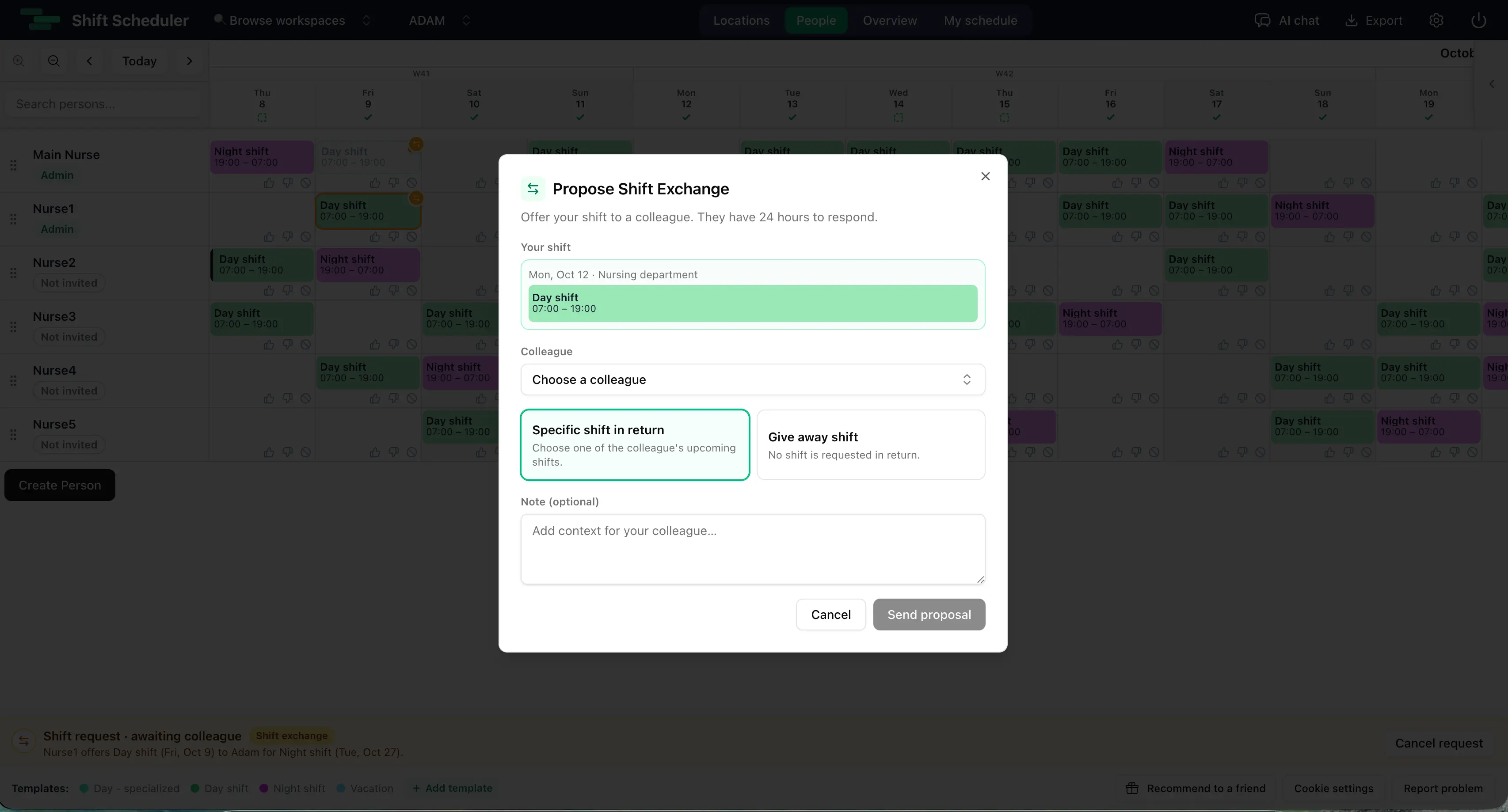
The proposal form keeps the decision focused:
- the employee's original shift is shown at the top,
- the colleague picker includes active workspace members,
- Specific shift in return lists the colleague's eligible upcoming shifts,
- Give away shift removes the requirement for a return shift,
- an optional note explains the reason or adds context.
Referenced shifts are reserved while the request is active. The same assignment cannot be placed into several unresolved swap requests, which avoids competing promises and ambiguous approvals.
The 24-hour acceptance window
The selected colleague has exactly 24 hours to accept or decline. If no decision is made, the request expires automatically and its reserved shifts become available for another proposal.
The time limit applies only to the colleague's response. After acceptance, the request can wait for manager approval without a deadline. This gives managers time to review coverage without leaving the recipient with an open-ended personal decision.
The requester can cancel an unresolved request at any time before final approval.
What managers see in the rota
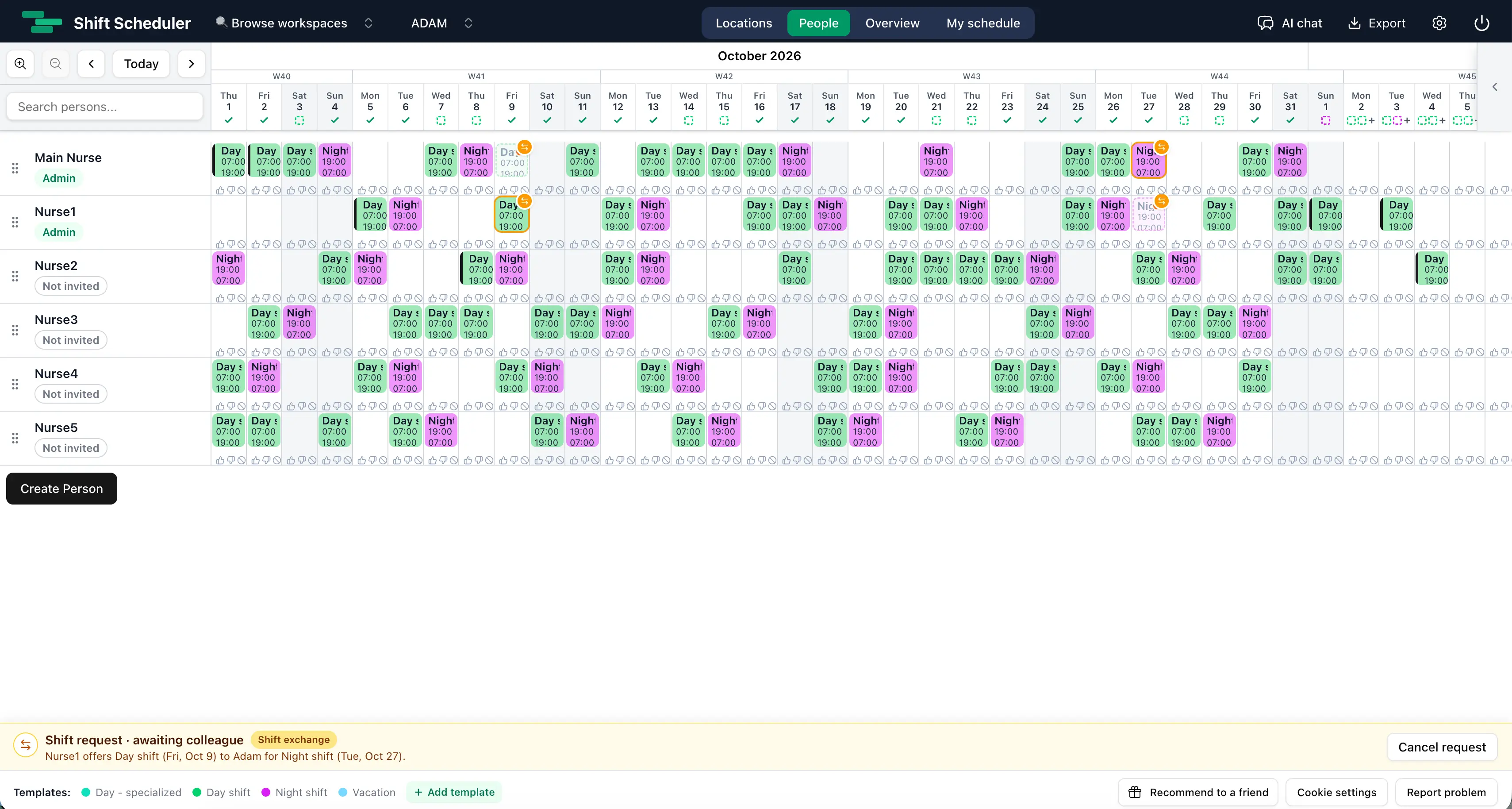
Pending requests appear in a compact amber bar near the bottom of the application. If several requests need attention, previous and next controls move through the queue. Requests on which the current user can act are prioritised, followed by the oldest requests.
On the People rota, the selected request is previewed visually:
- an amber exchange marker identifies each source assignment,
- a ghost shift shows the proposed new position,
- an exchange displays both destinations,
- a give-away displays the one transferred destination.
The preview is not a schedule edit. Until final approval, hour totals and published assignments remain unchanged.
Manager approval and rota safety checks
Final approval is more than a permission check. Shift Scheduler revalidates the request immediately before changing the rota.
Approval is blocked if:
- either shift has started,
- a referenced shift was deleted, reassigned, or materially edited,
- either participant no longer has active workspace access,
- a referenced shift has an unpublished draft change,
- the new assignment would overlap another published or working shift,
- an overnight shift creates an interval conflict on the following day.
The swap or transfer and the request status are saved in one database transaction. Either the complete change succeeds or the published rota stays as it was. One history record captures the affected shift updates, and existing shift webhooks run only after the transaction commits.
These checks make the feature suitable for healthcare rotas, hospitality schedules, retail staffing, security teams, manufacturing and other operations where a convenient shift trade must still preserve safe coverage.
Shift exchanges with Draft Schedule enabled
Shift exchanges work alongside Draft Schedule approval for rota planning.
An approved exchange updates the published assignments immediately; it does not become another draft edit. For that reason, approval is blocked when either referenced shift already has a pending draft change.
Admins can always approve. When Draft Schedule is enabled, managers can approve only if they also have permission to publish the draft rota. If manager publishing is disabled, final approval remains with admins.
The interface keeps both workflows visible. The pending-draft bar sits above the shift-request bar, so a staffing manager can review unpublished schedule work and employee exchange requests without one hiding the other.
Why a managed shift swap process is better than chat
Messaging tools are useful for finding a willing colleague, but they are not a reliable rota approval system. Important details can be split across several messages, and the manager still has to check the live schedule manually.
A shift swap feature inside employee scheduling software provides a single source of truth:
- the proposed assignments are explicit,
- both employees see the same request,
- acceptance and manager approval are separate decisions,
- expired and stale proposals close automatically,
- overlap checks use the actual rota,
- the final assignment change is recorded in schedule history.
That reduces administrative work while keeping accountability clear.
Who can enable shift exchanges?
Shift exchanges are enabled by default. Admins and managers can turn the feature on or off under Settings → General.
Disabling the feature requires confirmation. All unresolved exchange and give-away requests are declined in the same operation, so no hidden request can later be approved against a disabled policy. Re-enabling the setting allows employees to create new proposals.
Practical rota-planning examples
Nursing rota: A nurse scheduled for Saturday day shift needs Sunday free. A colleague offers Sunday night shift in return. The ward manager checks rest and overlap constraints before approving.
Hospitality schedule: A server cannot work Friday evening. Another active team member accepts the shift as a give-away, and the restaurant manager approves the transfer.
Retail rota: Two employees prefer each other's weekend assignments. They submit one shift trade instead of asking a supervisor to edit both shifts manually.
24/7 operations: Overnight assignments cross calendar dates. The approval check compares real time intervals, so a technically different date cannot hide an overlap.
Knowledge base summary
- A shift swap exchanges two upcoming published assignments.
- A give-away transfers one assignment without a return shift.
- The selected colleague has 24 hours to accept or decline.
- Acceptance does not change the rota; manager or admin approval is still required.
- There is no manager-approval deadline.
- Active requests reserve their referenced shifts.
- Material edits, started shifts and inactive memberships invalidate a request.
- Approval checks published and working schedules for overlaps, including overnight work.
- Draft permissions determine whether a manager or only an admin may approve.
- The feature is enabled by default and can be disabled by admins or managers.
FAQ
Can employees swap shifts themselves?
Employees can propose and accept a shift swap, but they cannot complete it by themselves. The published rota changes only after an authorised manager or admin approves the request.
How long does somebody have to accept a shift exchange?
The selected colleague has exactly 24 hours. An unanswered request is automatically declined and its shift reservations are released.
Does accepting a shift swap change the rota immediately?
No. Acceptance moves the request to pending manager approval. Both original assignments remain in place until final approval.
Can an employee give away a shift without receiving another shift?
Yes. The employee selects Give away shift, chooses a colleague, and submits the request. The recipient and then a manager or admin must approve the transfer.
Can two requests use the same shift?
No. A shift referenced by an unresolved exchange or give-away is reserved and cannot be used in another active request.
What happens if a shift changes while approval is pending?
A material edit, reassignment, deletion, start of the shift, or loss of active participant access invalidates the request. Note-only edits do not invalidate it.
Can a manager approve their own shift exchange?
Yes, if their role has approval authority. With Draft Schedule enabled, a manager also needs permission to publish drafts; admins can always approve.
Does the system prevent overlapping shifts after a swap?
Yes. Final approval checks the resulting assignments against published shifts and pending working-schedule changes, including overnight intervals.