Shift Scheduler Blog
Draft Schedules: A Safer Approval Workflow for Rota Planning
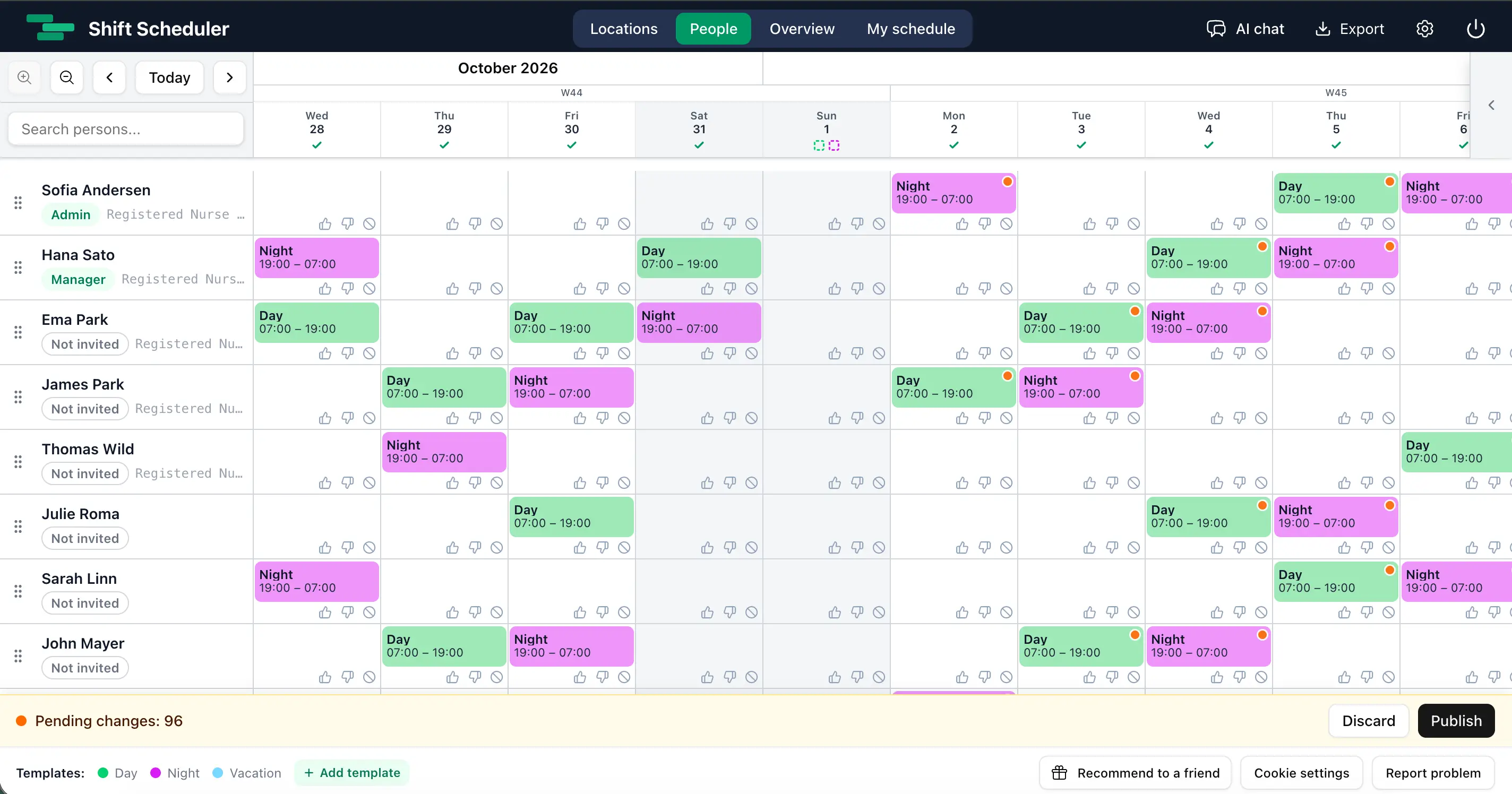
A staff rota often changes many times before it is ready. A staffing manager may move shifts, compare coverage, ask another manager to review the plan, and run AI scheduling before employees should see anything.
Publishing every small edit immediately makes that work unnecessarily risky. Employees can mistake unfinished shifts for confirmed work, while repeated email notifications create confusion.
Draft Schedule adds a clear approval stage to rota planning. Managers and admins can prepare one shared working schedule, while members continue to see the last published rota. When the plan is ready, an authorised person publishes every pending change together.
What is a draft schedule?
A draft schedule is an unpublished working version of the staff rota.
In Shift Scheduler, there is one shared draft per workspace. Admins and managers work on the same version rather than creating separate copies. A shift added or changed in the draft is marked with an orange dot. A sticky bar shows how many unpublished changes are waiting.
Members do not see those changes until the draft is published. Their schedule remains stable during planning and review.
Why schedule approval matters
Rota planning is rarely a single-person task. A department manager may prepare coverage, a staffing manager may check hours, and an admin may be responsible for final schedule approval.
Without a draft workflow, teams usually rely on workarounds:
- building the rota in a spreadsheet before copying it into scheduling software
- telling employees to ignore the app until planning is finished
- making changes late at night to reduce the chance that somebody sees them
- sending manual messages when an unfinished schedule changes again
A private working schedule removes this gap. The rota can be reviewed where it will ultimately be used, with the same people, locations, open-slot capacity, hour totals, exports, and AI scheduling context.
How the Draft Schedule workflow works
An admin enables Draft Schedule in Settings → General.
After it is enabled:
- Admins and managers create, update, move, or delete assigned shifts.
- Those edits become unpublished changes in the shared draft.
- Editors see the published schedule with the draft changes overlaid.
- Members continue to see only the published schedule.
- The team reviews coverage, staffing levels, hours, and conflicts.
- An authorised person selects Publish.
- All pending changes become the new published schedule in one operation.
The footer bar always shows the current number of unpublished changes. Every admin and manager can discard the complete draft after confirming the action.
Admin approval or manager publishing
Admins control who can publish the rota.
| Publishing policy | Result |
|---|---|
| Admins only | Managers can prepare and review the draft, but an admin must publish it. |
| Admins and managers | Either role can publish the shared draft when planning is complete. |
Admins can always publish. The manager publishing option is disabled by default, which supports organisations that require formal schedule approval.
This works alongside the existing roles and permissions in Shift Scheduler. It gives staffing managers room to plan without automatically giving every manager final publication authority.
What employees see during rota planning
Members see the last published schedule—not the working copy.
They can still submit availability preferences and vacation requests. Those workflows remain immediate because they are inputs to planning, not unpublished shift assignments.
While Draft Schedule is enabled, members cannot claim open slots or manage their own assigned shifts. This prevents a member from claiming capacity that a manager has already reserved in the private draft.
What happens to notifications and schedule history?
Draft edits do not create schedule history records, employee emails, or shift webhooks.
Only publication creates the official event. Shift Scheduler records one schedule.published history entry containing the net shift changes and contributor information. Email notification aggregation and shift webhooks begin only after the database transaction has committed.
This means employees receive information about the approved result rather than every intermediate planning decision. See email notifications in Shift Scheduler for more detail about notification preferences and aggregation.
Draft Schedule and AI staff scheduling
AI scheduling uses the same shared draft.
When an admin or manager asks the AI agent to create a rota, new assignments are drafted first. The AI also reads existing unpublished assignments when calculating coverage, open-slot capacity, rest rules, fairness, and schedule quality.
This makes AI useful inside a controlled approval workflow:
- AI proposes or creates assignments in the working schedule.
- A staffing manager reviews the result.
- Managers can adjust individual shifts without publishing early.
- An authorised person approves and publishes the complete rota.
AI-generated staffing changes therefore follow the same review process as manual edits.
One shared draft, one clear source of truth
Shift Scheduler deliberately uses one workspace-wide draft rather than personal drafts.
That decision keeps collaboration simple. If one manager moves a shift, another manager sees that working change when they reload or navigate. There is no merge screen and no uncertainty about which draft should be approved.
The trade-off is intentional: publication and discard apply to the entire draft, not a selected date range. Teams should treat the pending-changes bar as the review queue for the next schedule release.
What is included in the draft?
Draft Schedule covers regular assigned shifts.
| Drafted until publication | Remains immediate |
|---|---|
| Creating an assigned shift | Vacation and Time Off requests |
| Updating or moving an assigned shift | Availability and shift preferences |
| Deleting an assigned shift | Open-slot configuration |
| AI-created assignments | Shift templates |
| REST API, MCP, and ChatKit shift edits | Person and location administration |
Immediate configuration changes are kept outside the draft so the scheduling model does not become a second copy of the whole workspace.
When should a staffing manager use Draft Schedule?
Draft Schedule is especially useful when:
- a monthly rota needs approval before release
- several managers collaborate on staff scheduling
- an admin must review a manager’s work
- AI creates a first version that needs human review
- shift changes would otherwise trigger too many employee notifications
- healthcare, hospitality, retail, security, or operations teams need a controlled publication point
It is less important for a very small team where every scheduling edit is intentionally visible immediately. Draft Schedule is optional, and existing workspaces keep immediate publishing unless an admin enables it.
Knowledge base summary
- Draft Schedule is a private working version of the staff rota.
- Each workspace has one shared draft for admins and managers.
- Members see only published shifts.
- Admins decide whether managers may publish.
- Draft edits create no history, email notifications, or shift webhooks.
- Publishing applies all net changes atomically and creates one history event.
- AI, REST API, MCP, and web edits use the same draft.
- Orange dots identify draft-created or draft-modified shifts.
- Vacation requests and preferences remain immediate.
- Draft mode can be disabled only after pending changes are published or discarded.
FAQ
What is schedule approval in rota planning?
Schedule approval is the step between building a staff rota and releasing it to employees. Managers prepare and review the working schedule, then an authorised admin or manager publishes the approved version.
Can employees see a draft rota?
No. Members continue to see the last published schedule until the shared draft is published.
Can several managers edit the same draft schedule?
Yes. A workspace has one shared draft for all managers and admins. Their net changes are combined into the same working schedule.
Can a manager publish the rota?
Only if an admin enables manager publishing. Admins can always publish; otherwise managers prepare the draft and wait for an admin to approve it.
Does AI scheduling publish shifts automatically?
No. When Draft Schedule is enabled, AI-generated assignments are unpublished first and follow the same review and approval process as manual shift changes.
Are employees emailed about every draft change?
No. Draft edits do not send emails. Notifications are queued only after the complete draft is published.
Can part of a draft be published?
No. The draft belongs to the whole workspace and is published or discarded as one unit.